
Agent

One agent. Every customer moment.

The customer-facing side of Unless — one AI Customer Agent across acquisition, retention, expansion, and support, with the Help Center it auto-generates as its public face. Browse a moment, or see the full overview.

Acquisition

Qualify, convert, educate. 24/7 on your marketing site.

Retention

See churn coming. Act before it does, inside the customer's product.

Expansion

Catch upsell signals early. Route them to the right owner.

Support

Resolve, co-pilot, learn — across every helpdesk and channel.

Engine

The platform underneath.

The back-of-house side of Unless — a Living Knowledge library that maintains itself, plus the Train → Test → Deploy → Analyze loop that keeps every Customer Agent sharper after every conversation. See how the engine compounds.

Train

Always current. Always ready. Living Knowledge + Living Context.

Test

Before a customer sees it. Preview, simulate, audit.

Deploy

One agent. The whole journey. Memory across all of it.

Analyze

Performance, value, AI maturity. All visible. All live.

Trust

Built for the EU from day one

The architecture that lets your DPO, security, and procurement teams sign off without slowing your team down. Browse the page, or jump straight to a section.

Privacy Vault

Twelve numbered measures keep sensitive identifiers home.

Compliance posture

Three pillars — sovereignty, AI Act readiness, sector readiness.

Architecture

Five EU-resident layers — touchpoints to LLM constellation.

Frameworks

EU AI Act, GDPR, DORA, OWASP — built into the platform, not bolted on.

Customers

Trusted by leaders

How regulated-Europe brands — from Visma to Onguard — turned customer success into a revenue engine with Unless.

Visma Enterprise AS

Norway's leading ERP — modernized self-service with Unless.

Helping patients

Patient self-service surged within weeks of deploying Unless.

Enhancing credit software

Financial service Onguard powers their support operations with Unless.

Ticket deflection at scale

Meet Sally, Kontek’s AI support colleague in regulated finance.

Resources

Search resources and support articles

Documentation, articles, and recipes for getting the most out of your Unless deployment — plus a help desk when you need a human.

Help center

Get-started guides and advanced playbooks for the platform.

Security and compliance

Privacy measures, security by design, and compliance guidelines.

Developer documentation

Find reference documentation for the javascript API.

The Unless cookbook

Bite-sized examples for every stage of the customer lifecycle.

Pricing

Pay per outcome. You choose.

Two equal-weight plans, both built around outcomes. Browse the page, or jump straight to a section.

The two plans

Flex (€0.99 per outcome) or Fixed (€1,999/month). Equal weight.

What's included

Full platform on both — Living Knowledge, Memory, Context.

Flex modules

Productized add-ons. À la carte on Flex, bundled into Fixed.

Frequently asked

What counts as an outcome, fair use, and switching mid-year.

Article

How to view AI insights

Find out how you can view the insights for your AI, including views, conversations, responses, and more.

Updated 19 March 2024

Once your AI is trained and live, you can check out insights about it in the AI zone.

You can click around and see the number of views, conversations, and responses. You can also view how many answers received a thumbs up or thumbs down, and how many were forwarded to support.
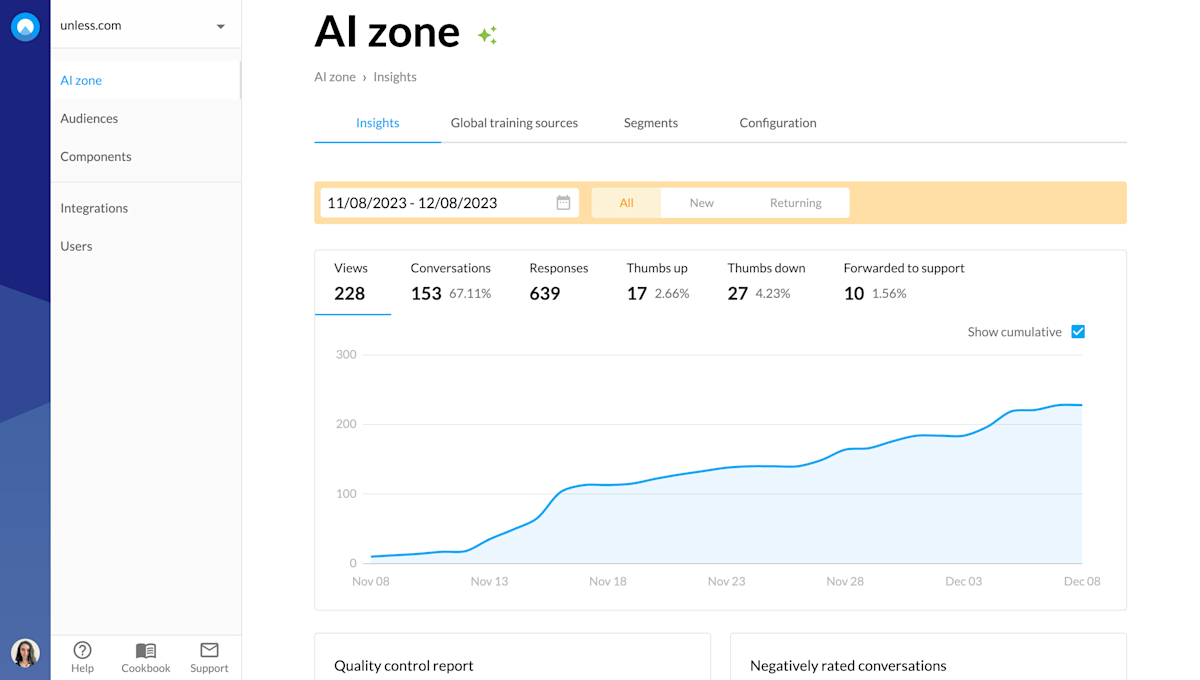
AI zone insights

Here you can select a date range that you’d like to see insights for as well as if you’d like to see the numbers for all visitors, new, or returning visitors.

You can also check off the cumulative box to see numbers per day rather than adding up over time. An example of this can be seen below.
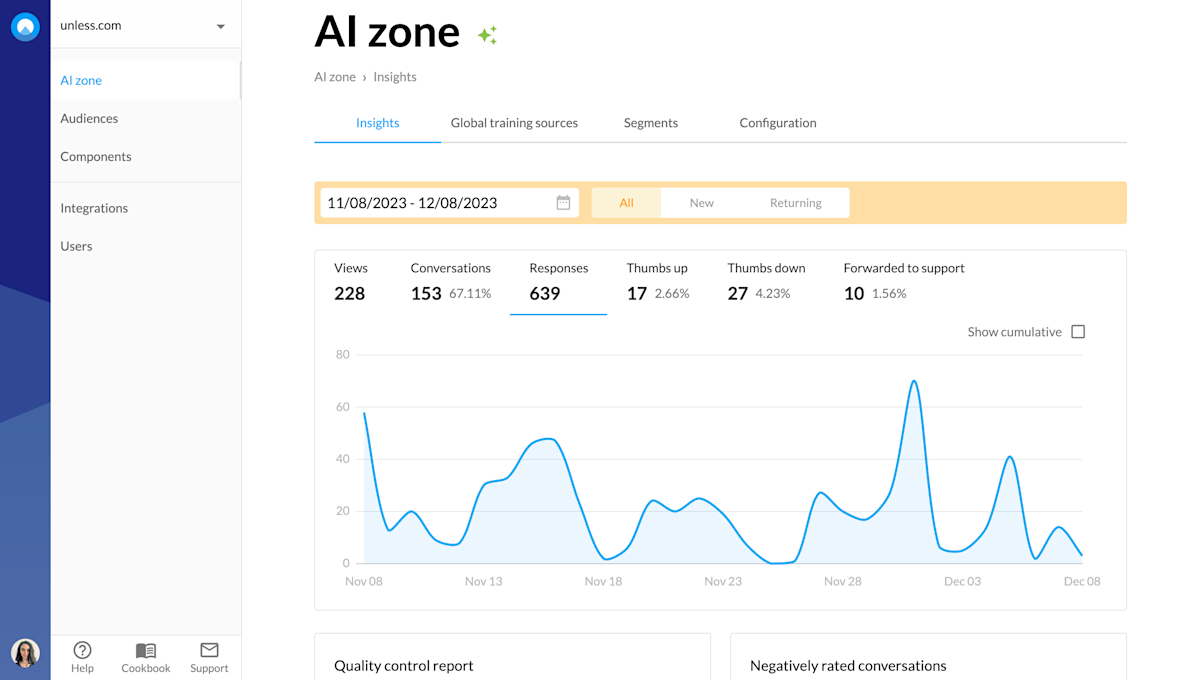
AI zone insights with different tabs and options

Below the graph, you will see four blocks. Let's go over each one.

Most common questions in the last 30 days

The name is pretty self-explanatory as this is a list of the top 10 questions that were asked to your AI in the last 30 days. Next to the question, you will see how many times that particular question has been asked.
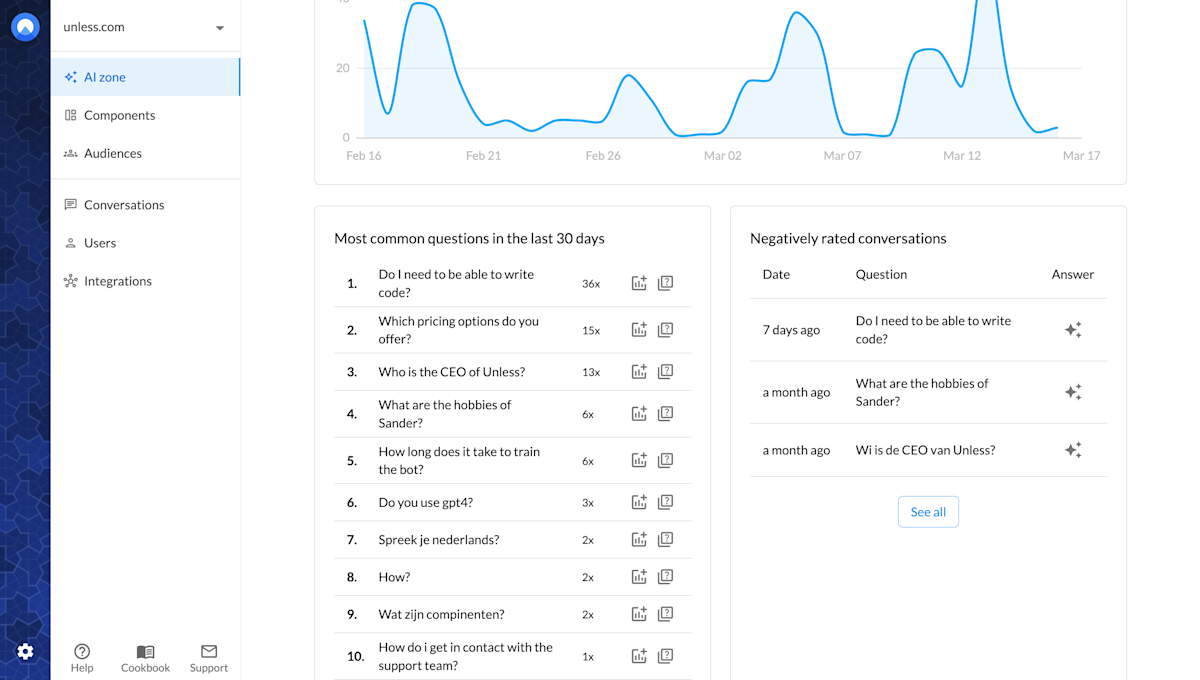
Most common questions in the last 30 days

Once you know what the top questions are, you also know where to dedicate your attention. It is good to make sure that the AI can answer these questions well. To help with this, there are two actions you can take right from this block: add the question to the quality control center and add it as an FAQ.

Add to quality control center

So there's a handy icon (with the plus sign) which you can use to add the question to the quality control center along with your desired answer. As you can see in the screenshot below, optionally you can specify a segment that the question and answer belong to.
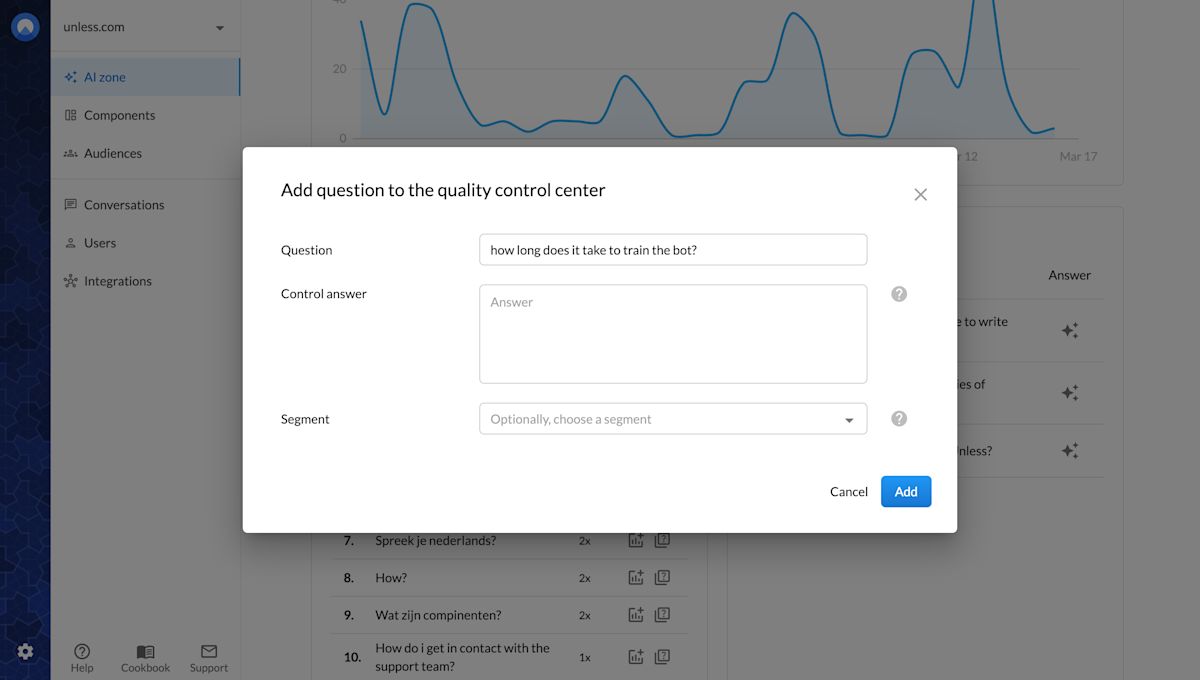
Add question to the quality control center

Add as FAQ

Check how the AI is currently answering this question using the Test your AI button or the Quality control center. If the AI currently can't answer or doesn't have an answer to this question, you can add it as an FAQ to make sure your users get the answers they need.
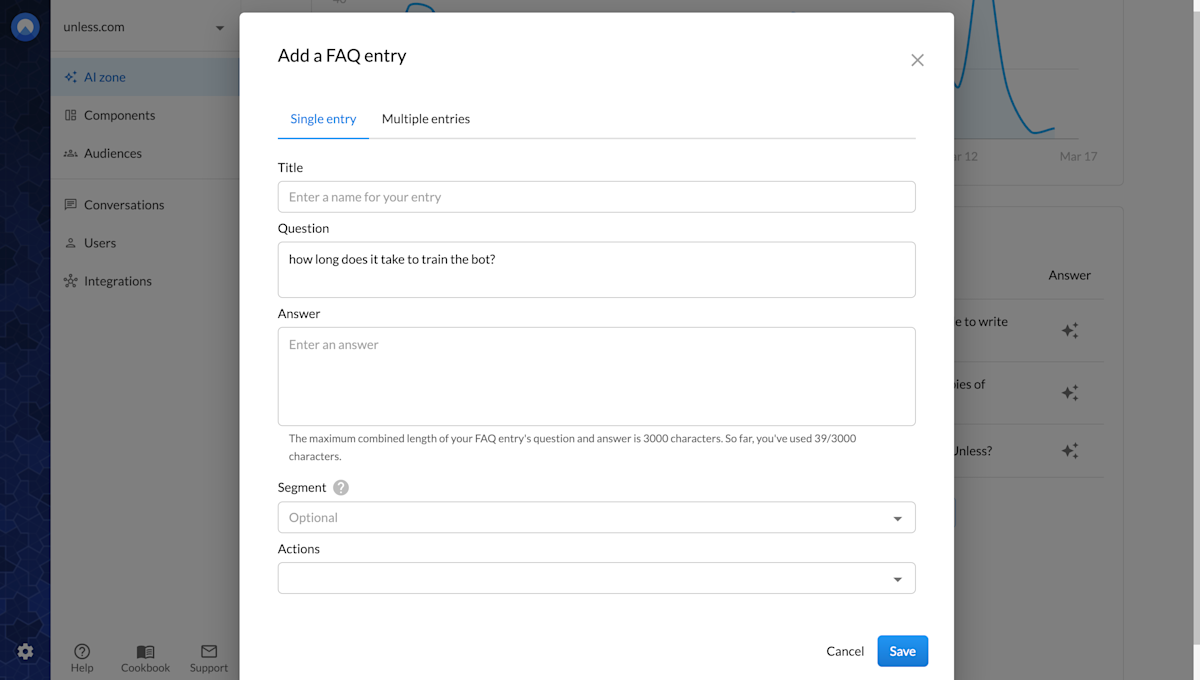
Add question as an FAQ

To add an FAQ, you give it a title and add the question along with its answer. Optionally, you can select a segment that the FAQ belongs to and attach actions you'd like to trigger when this question is asked.

Negatively rated conversations

Next to the Most common questions in the last 30 days block is Negatively rated conversations. This overview helps you stay on top of any potential issues at a quick glance and take action when necessary. Find out more about how you can review and improve conversations.

Most common used sources in the last 30 days

Once again with a self-explanatory name, here you get an overview of the top 10 sources that are used the most by the AI in the last 30 days. Ensuring that these sources are properly indexed, accurate, and up-to-date will provide better results.
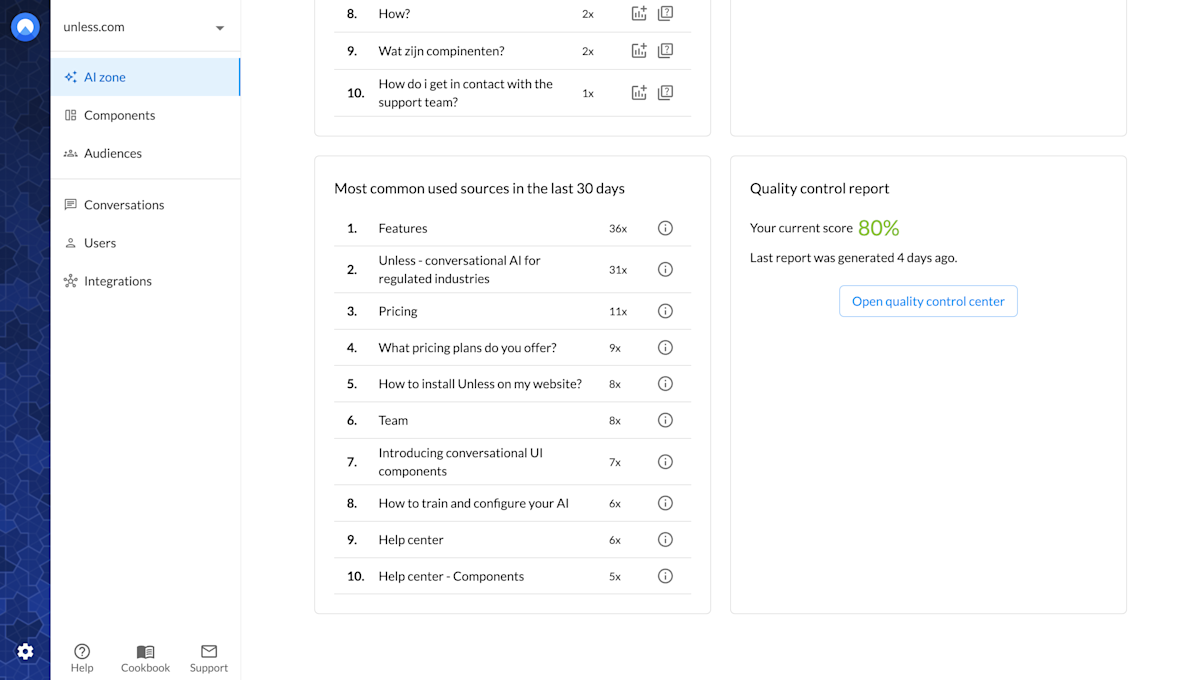
Most common used sources in the last 30 days

View source

You can easily view a source on this list by clicking the i icon next to it. This way you can quickly check if the source has been properly indexed by the AI. You can also give it a read to see if everything is still true and not outdated or if any updates and additions are needed to make the source more complete.
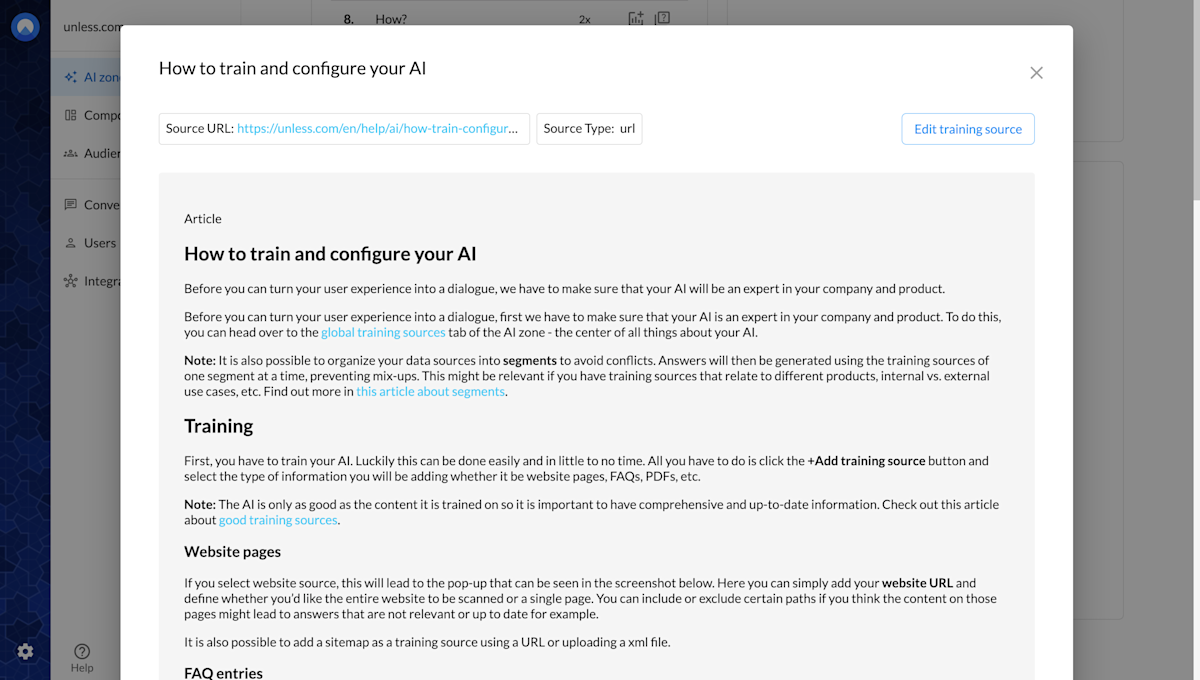
View a top source at a glance

Quality control report

Lastly, the quality control center helps you compare your desired answers to the answers provided by the AI, for questions you've added. Make sure to check out the article on how to make use of the quality control center for more information.

Related content

We're here to help

Quick responses if you have an issue. Feel free to ask us anything — or ask our conversational AI a question.