
Agent

One agent. Every customer moment.

The customer-facing side of Unless — one AI Customer Agent across acquisition, retention, expansion, and support, with the Help Center it auto-generates as its public face. Browse a moment, or see the full overview.

Acquisition

Qualify, convert, educate. 24/7 on your marketing site.

Retention

See churn coming. Act before it does, inside the customer's product.

Expansion

Catch upsell signals early. Route them to the right owner.

Support

Resolve, co-pilot, learn — across every helpdesk and channel.

Engine

The platform underneath.

The back-of-house side of Unless — a Living Knowledge library that maintains itself, plus the Train → Test → Deploy → Analyze loop that keeps every Customer Agent sharper after every conversation. See how the engine compounds.

Train

Always current. Always ready. Living Knowledge + Living Context.

Test

Before a customer sees it. Preview, simulate, audit.

Deploy

One agent. The whole journey. Memory across all of it.

Analyze

Performance, value, AI maturity. All visible. All live.

Trust

Built for the EU from day one

The architecture that lets your DPO, security, and procurement teams sign off without slowing your team down. Browse the page, or jump straight to a section.

Privacy Vault

Twelve numbered measures keep sensitive identifiers home.

Compliance posture

Three pillars — sovereignty, AI Act readiness, sector readiness.

Architecture

Five EU-resident layers — touchpoints to LLM constellation.

Frameworks

EU AI Act, GDPR, DORA, OWASP — built into the platform, not bolted on.

Customers

Trusted by leaders

How regulated-Europe brands — from Visma to Onguard — turned customer success into a revenue engine with Unless.

Visma Enterprise AS

Norway's leading ERP — modernized self-service with Unless.

Helping patients

Patient self-service surged within weeks of deploying Unless.

Enhancing credit software

Financial service Onguard powers their support operations with Unless.

Ticket deflection at scale

Meet Sally, Kontek’s AI support colleague in regulated finance.

Resources

Search resources and support articles

Documentation, articles, and recipes for getting the most out of your Unless deployment — plus a help desk when you need a human.

Help center

Get-started guides and advanced playbooks for the platform.

Security and compliance

Privacy measures, security by design, and compliance guidelines.

Developer documentation

Find reference documentation for the javascript API.

The Unless cookbook

Bite-sized examples for every stage of the customer lifecycle.

Pricing

Pay per outcome. You choose.

Two equal-weight plans, both built around outcomes. Browse the page, or jump straight to a section.

The two plans

Flex (€0.99 per outcome) or Fixed (€1,999/month). Equal weight.

What's included

Full platform on both — Living Knowledge, Memory, Context.

Flex modules

Productized add-ons. À la carte on Flex, bundled into Fixed.

Frequently asked

What counts as an outcome, fair use, and switching mid-year.

Article

Self-segmentation - personalize based on visitors' traits

Are you missing some data to provide a better experience? Use a component to let your visitors self-segment.

Updated 18 February 2025

Often the main roadblock to better experiences is that we just don’t know enough about our visitors. There are two ways to solve this problem; either take the difficult road and wait for subtle signals of intent or simply ask:

  • Who are you?
  • Why are you here?
  • What are your needs?

To help you gather this information, we added a self-segmentation functionality to our components. It's an easy way to survey your visitors with a single question and to group them into audiences.

This allows you to optimize the digital journey of each visitor, personalize your content, explain your product from their perspective, and highlight the right features. On top of that, self-selection gives you a better understanding of how your website traffic is composed and who your best-converting visitors are. To read more about how powerful this tool can be, take a look at the case study about ClassTag, a customer that increased conversion rate by 150% using self-segmentation.

How to set up a component with self-segmentation

1. Decide on the question

Self-selection is a subtle tool to better understand your visitors. What the question will be, highly depends on your website and your goal. Here are some examples:

  • What are you interested in?
  • What industry are you in?
  • What is your job title?
  • What brings you here today?
  • What feature is most important to you...
  • Are you a buyer or a seller?

When the visitor chooses one of the provided answers, they will be assigned to the corresponding audience.

2. Define corresponding audiences

As the name suggests, self-segmentation means that the answer a visitor chooses will define the audience they join. So, before you create a component with self-segmentation functionality, make sure you have the necessary audiences in Unless. If you'd already set the audiences based on various targeting conditions, you're good to go.

If there are no other conditions to a visitor joining a particular audience, other then them segmenting themselves, here's what you can do. Under targeting conditions, select Behavior, and then Self-segmentation. That's it!

Make sure to give your audience a defining name. Choosing a generous membership duration (e.g. 30 days) will help you better understand how your website traffic is composed. Your audience could look similar to the screenshot below.
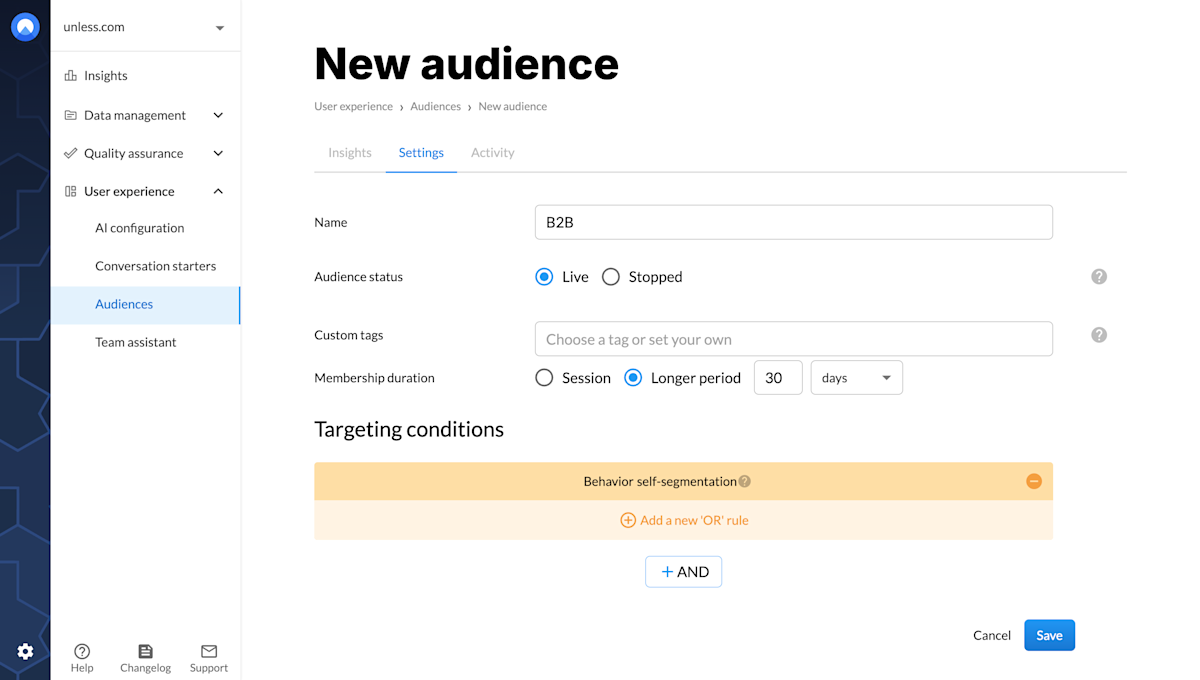
Audience: self-segmentation

Tip: If for some of your visitors, you already know which audience they belong to, you can exclude them from this particular experience. Optionally, you can still include them if you'd like to have the confirmation or just to double check.

3. Set up your component

Then its time to set up your component! The general steps for this have been explained in individual articles about inline and overlay components so here we will focus specifically on the self-segmentation aspect.

The panel on the right will have two fields of interest to us: primary and secondary buttons, though here that classification is less important. Under each button you will see an option to enable them and to "Join audience". Here, you can select your desired audience(s) from a dropdown, and that's it! Adjust the copy, the visuals, the links etc. Make sure you save your draft, create version, and publish. Now, when a visitor sees this component and clicks on one of the buttons, they will automatically join the corresponding audience. You can then get to optimizing the rest of their journey accordingly.
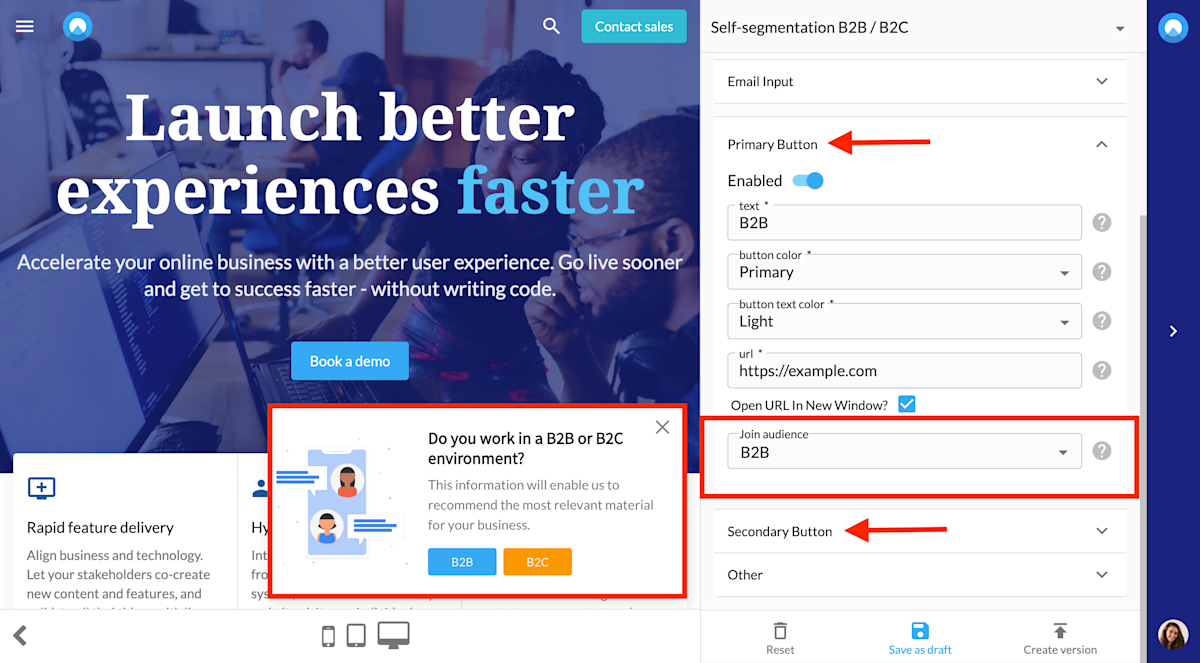

Unless component self-segmentation

We're here to help

Quick responses if you have an issue. Feel free to ask us anything — or ask our conversational AI a question.