
Agent

One agent. Every customer moment.

The customer-facing side of Unless — one AI Customer Agent across acquisition, retention, expansion, and support, with the Help Center it auto-generates as its public face. Browse a moment, or see the full overview.

Acquisition

Qualify, convert, educate. 24/7 on your marketing site.

Retention

See churn coming. Act before it does, inside the customer's product.

Expansion

Catch upsell signals early. Route them to the right owner.

Support

Resolve, co-pilot, learn — across every helpdesk and channel.

Engine

The platform underneath.

The back-of-house side of Unless — a Living Knowledge library that maintains itself, plus the Train → Test → Deploy → Analyze loop that keeps every Customer Agent sharper after every conversation. See how the engine compounds.

Train

Always current. Always ready. Living Knowledge + Living Context.

Test

Before a customer sees it. Preview, simulate, audit.

Deploy

One agent. The whole journey. Memory across all of it.

Analyze

Performance, value, AI maturity. All visible. All live.

Trust

Built for the EU from day one

The architecture that lets your DPO, security, and procurement teams sign off without slowing your team down. Browse the page, or jump straight to a section.

Privacy Vault

Twelve numbered measures keep sensitive identifiers home.

Compliance posture

Three pillars — sovereignty, AI Act readiness, sector readiness.

Architecture

Five EU-resident layers — touchpoints to LLM constellation.

Frameworks

EU AI Act, GDPR, DORA, OWASP — built into the platform, not bolted on.

Customers

Trusted by leaders

How regulated-Europe brands — from Visma to Onguard — turned customer success into a revenue engine with Unless.

Visma Enterprise AS

Norway's leading ERP — modernized self-service with Unless.

Helping patients

Patient self-service surged within weeks of deploying Unless.

Enhancing credit software

Financial service Onguard powers their support operations with Unless.

Ticket deflection at scale

Meet Sally, Kontek’s AI support colleague in regulated finance.

Resources

Search resources and support articles

Documentation, articles, and recipes for getting the most out of your Unless deployment — plus a help desk when you need a human.

Help center

Get-started guides and advanced playbooks for the platform.

Security and compliance

Privacy measures, security by design, and compliance guidelines.

Developer documentation

Find reference documentation for the javascript API.

The Unless cookbook

Bite-sized examples for every stage of the customer lifecycle.

Pricing

Pay per outcome. You choose.

Two equal-weight plans, both built around outcomes. Browse the page, or jump straight to a section.

The two plans

Flex (€0.99 per outcome) or Fixed (€1,999/month). Equal weight.

What's included

Full platform on both — Living Knowledge, Memory, Context.

Flex modules

Productized add-ons. À la carte on Flex, bundled into Fixed.

Frequently asked

What counts as an outcome, fair use, and switching mid-year.

Article

Audiences based on URL parameters

Learn how to send data from any source (e.g. Facebook, ads, a CRM, a form, email,...) to Unless to create an improved website experience.

Updated 8 January 2025

What are URL parameters?

Parameters are little snippets of information, added to a URL. They transfer information between places and are great for creating an enhanced website experience. The information transferred through parameters can come from

  • ad networks (e.g. Facebook, AdWords)
  • your own data sources (CRM or ESP)
  • your website (= a hash or string at the end of a URL)

Targeting options for parameter-based audiences

  • UTM source: Create an audience based on the utm_source attached to the URL. Example: utm_source=adwords
  • UTM medium: Create an audience based on the utm_medium attached to the URL. Example: utm_medium=paid-search
  • UTM campaign: Create an audience based on the utm_campaign attached to the URL. Example: utm_campaign=shoe-promotion
  • UTM content: Create an audience based on the utm_content attached to the URL. Best practice suggest to use "content" to describe the ad/newsletter/post, which allows for identifying individual promotions. Example: utm_content=summer-shoes
  • UTM term: Create an audience based on the utm_term attached to the URL. It is typically used to identify keywords for paid ads. Example: utm_term=black-leather-boots

Setting up an audience based on URL parameters for a holiday promo campaign

  • Hash: Hash marks (#) introduce an optional fragment near the end of the URL. They're typically used in eCommerce and affiliate marketing.
  • Query String Parameters: Query string parameters are used for sending information through the URL (e.g. example.com/?search=dresses).
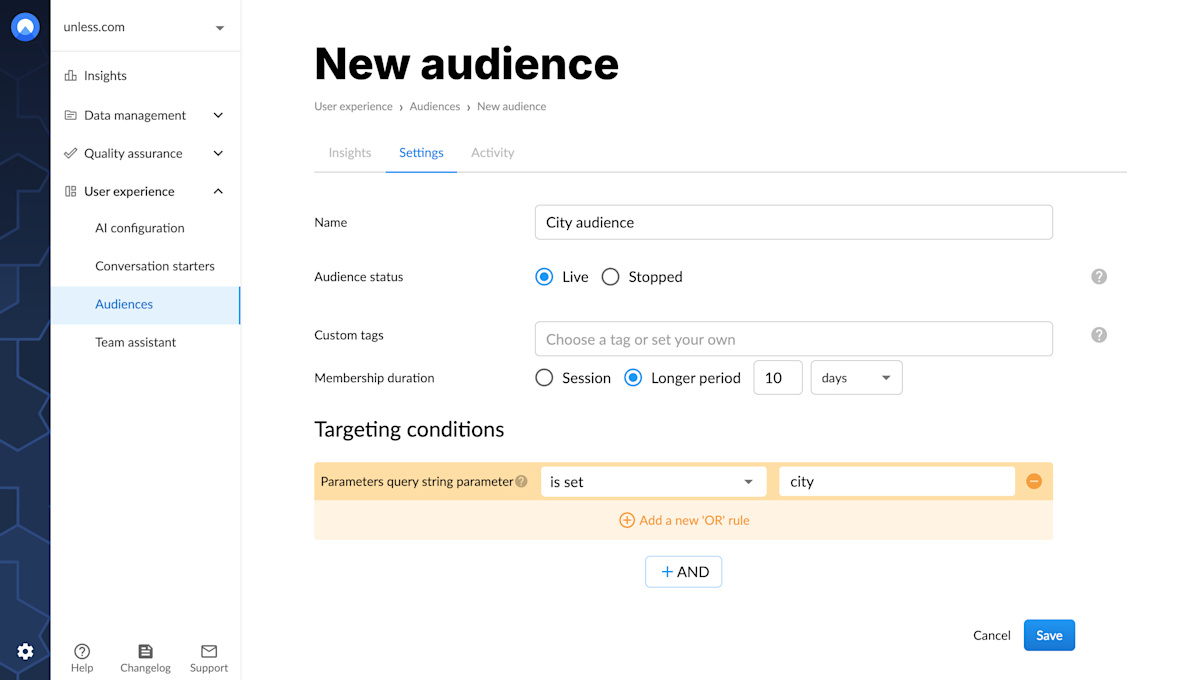
Setting up an audience based on the query string parameter

Here we selected "city" as the query parameter key. So, that matches mysite.com/?city=Amsterdam, ?city=Paris, ?city=London... To target a specific key value (e.g. Amsterdam) you would have to change the trigger to "city=Amsterdam".

Tips and best practices

  • The triggers "is empty" and "is not empty" are particularly useful here to set up audiences that trigger if no (or any) parameter is set.
  • When applicable, try to use the "contains" trigger instead of "equals". This is especially true for triggers based on parameters. For example, if you used "utm_source equals adwords" but the link is "mysite/?utm_source=adwords/", the experience wouldn't trigger correctly. The / at the end of the link wouldn't be an exact match.
  • Query String Parameters are the most powerful targeting condition. With query string parameters, you can leverage information stored by your email service or CRM platform (e.g. your lead's job title).
  • Remember to correctly use the AND/OR function. For example: You can target visitors from two UTM campaigns but a person can only view one ad campaign at a time. So, use the "OR" function to combine those triggers.


Related content

Article

How to set up audiences

Defining audiences is the first step in developing an effective optimization strategy. Here's how to create audiences with Unless.

We're here to help

Quick responses if you have an issue. Feel free to ask us anything — or ask our conversational AI a question.